Responder Check — Did the Expected Genes Move?
In the app: Differential expression › Responder Check
Responder Check is a biological sanity check. You name the genes the treatment should move — a knock-down target, a known marker — optionally with the direction you expect, and the report tells you whether they changed in each contrast. If the treatment's own targets did not respond, nothing downstream is worth interpreting yet; a responder that moved the opposite way is the signature of a swapped contrast or a sample swap.
It reads the full DESeq2 results, so a gene that did not reach significance is still found — "did not change" and "is not in the data" are told apart.
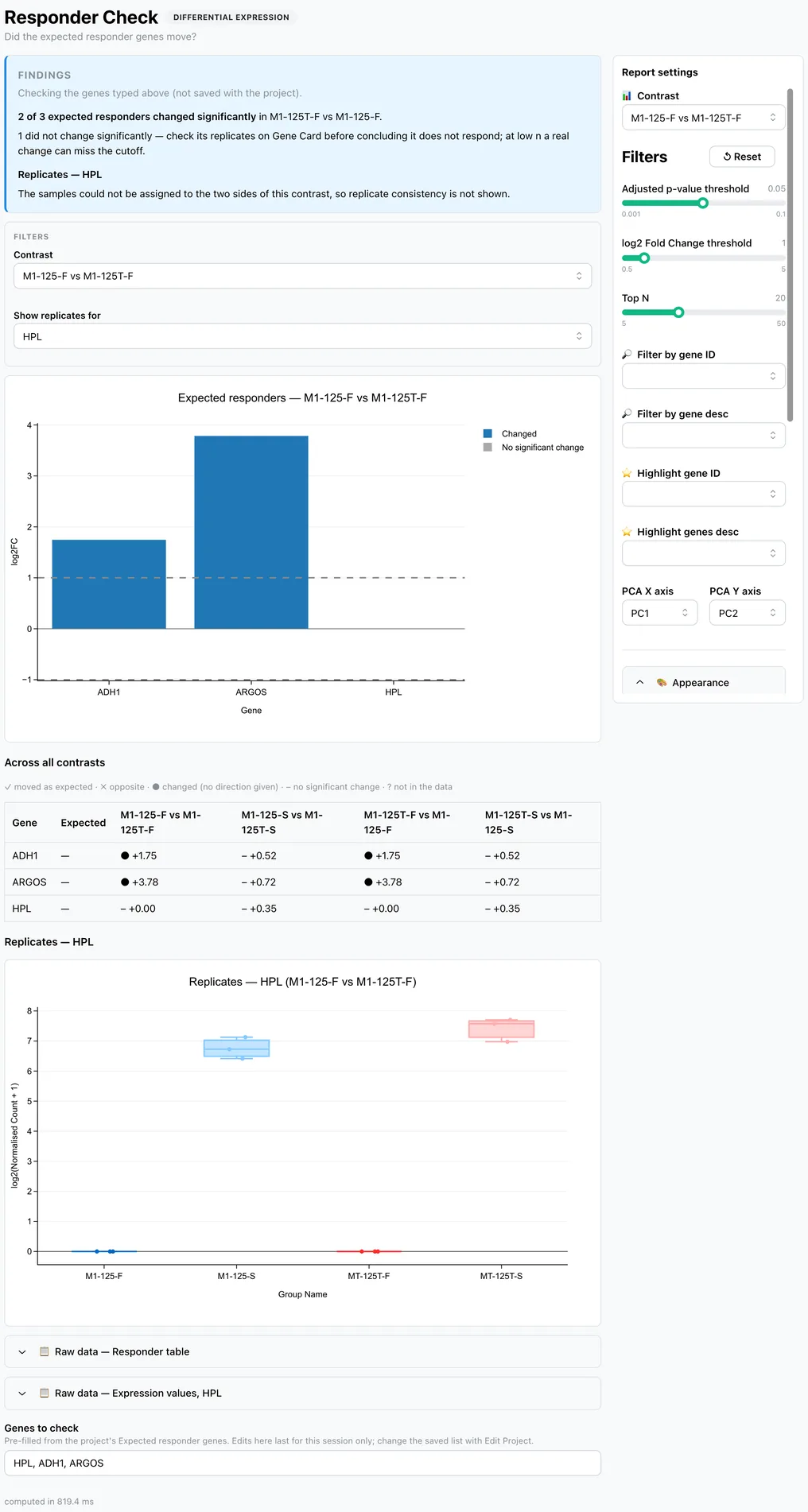
Example output from the sample project (genes HPL, ADH1 and ARGOS typed in).
Genes to check
The list of genes lives in a Genes to check box (in v2 it sits at the foot of the page). It is pre-filled from the project's Expected responder genes, recorded when the project was set up or later under Project Summary → Edit Project. Edits here last for this session only; change the saved list with Edit Project.
Enter gene symbols or IDs separated by commas, optionally with a direction: SOX9:up, COL2A1, MMP13:down. Entries that cannot be read are listed as Ignored. Up to 50 genes are checked.
When the list is empty the page says so and points to Edit Project.
Findings
- When the genes come from the box rather than the saved list: "Checking the genes typed above (not saved with the project)."
- The headline for the selected contrast: with directions given, how many moved as expected; without, how many changed significantly (e.g. "2 of 3 expected responders changed significantly in M1-125T-F vs M1-125-F").
- Genes that moved opposite to the expected direction, with the warning that a swapped reference and target, or a sample swap, produces exactly this.
- How many did not change significantly — check their replicates on Gene Card before concluding they do not respond; at low n a real change can miss the cutoff.
- Genes that could not be found in the results (spelling, or an ID type the results do not use).
- Replicates — gene: the replicate checks for the gene picked below, as on Gene Card.
Filters
Contrast
The contrast for the headline, the bar chart and the replicate view. Defaults to the contrast in Report settings.
Show replicates for
One of the found genes, for the replicate plot.
Expected responders chart
Titled Expected responders — contrast: one bar per gene (x-axis Gene, y-axis log2FC), coloured by verdict — As expected green, Changed blue, Opposite red, No significant change grey, Not tested light grey. Dashed lines mark ± the log2FC threshold. Hover a bar for its padj and expected direction.
Across all contrasts
A gene × contrast grid, each cell a mark and the log2FC: ✓ moved as expected · ✗ opposite · ● changed (no direction given) · – no significant change · ? not in the data.
Replicates plot
Replicates — gene (contrast), the same plot as on Gene Card: one box per group with each sample as a dot, on log2(Normalised Count + 1).
Raw data
Raw data — Responder table — one row per gene and contrast.
| Column | Meaning |
|---|---|
| Gene | The name as you entered it |
| Expected | up, down, or — when no direction was given |
| Contrast | The comparison |
| gene_id | The gene it matched in the results (blank if not found) |
| log2FoldChange / padj / baseMean | From the DESeq2 results |
| Verdict | As expected, Opposite, Changed, No significant change, Not tested, or Not in data |
Raw data — Expression values, gene — the replicate table: Sample, Group, Side, Normalised Count, log2(count+1).
Report settings that apply
Adjusted p-value threshold and log2 Fold Change threshold decide every verdict; Contrast sets the default contrast. See Report Settings.
Reading it
Genes are matched by gene ID (with or without a version suffix), by description, or by gene name. When a symbol is shared by several genes, the first match is used — check the gene_id column if a result looks surprising.